After starting this series [ClickHouse on Kubernetes](https://blog.duyet.net/2024/03/clickhouse-on-kubernetes.html), you can now configure your first single-node ClickHouse server.
Let's dive into creating your first table and understanding the basic concepts behind the ClickHouse engine, its data storage, and some cool features
- [Creating a Basic Table](#creating-a-basic-table)
- [MergeTree Engine](#mergetree-engine)
- [ORDER BY](#order-by)
- [Insert data](#insert-data)
- [Insert by FORMAT](#insert-by-format)
- [UNDROP 🤯](#undrop-)
- [DETACH/ATTACH](#detachattach)
- [TTL](#ttl)
- [LowCardinality(T) column data type](#lowcardinalityt-column-data-type)
# Creating a Basic Table
Here's a basic example of a table using the [MergeTree](https://clickhouse.com/docs/en/engines/table-engines/mergetree-family/mergetree) engine:
```sql
CREATE TABLE events
(
`event_time` DateTime,
`event_date` Date DEFAULT toDate(event_time),
`user_id` UInt32,
`event_type` String,
`value` String
)
ENGINE = MergeTree
PARTITION BY toYYYYMM(event_date)
ORDER BY (user_id, event_time)
```
ClickHouse column data types include [(full list)](https://clickhouse.com/docs/en/sql-reference/data-types)
- **Integer types**: [signed and unsigned integers](https://clickhouse.com/docs/en/sql-reference/data-types/int-uint) (`UInt8`, `UInt16`, `UInt32`, `UInt64`, `UInt128`, `UInt256`, `Int8`, `Int16`, `Int32`, `Int64`, `Int128`, `Int256`)
- **Floating-point numbers**: [floats](https://clickhouse.com/docs/en/sql-reference/data-types/float)(`Float32` and `Float64`) and [`Decimal` values](https://clickhouse.com/docs/en/sql-reference/data-types/decimal)
- **Boolean**: ClickHouse has a [`Boolean` type](https://clickhouse.com/docs/en/sql-reference/data-types/boolean)
- **Strings**: [`String`](https://clickhouse.com/docs/en/sql-reference/data-types/string) and [`FixedString`](https://clickhouse.com/docs/en/sql-reference/data-types/fixedstring)
- **Dates**: use [`Date`](https://clickhouse.com/docs/en/sql-reference/data-types/date) and [`Date32`](https://clickhouse.com/docs/en/sql-reference/data-types/date32) for days, and [`DateTime`](https://clickhouse.com/docs/en/sql-reference/data-types/datetime) and [`DateTime64`](https://clickhouse.com/docs/en/sql-reference/data-types/datetime64) for instances in time
- **JSON**: the [`JSON` object](https://clickhouse.com/docs/en/sql-reference/data-types/json) stores a JSON document in a single column
- **UUID**: a performant option for storing [`UUID` values](https://clickhouse.com/docs/en/sql-reference/data-types/uuid)
- **Low cardinality types**: use an [`Enum`](https://clickhouse.com/docs/en/sql-reference/data-types/enum) when you have a handful of unique values, or use [`LowCardinality`](https://clickhouse.com/docs/en/sql-reference/data-types/lowcardinality) when you have up to 10,000 unique values of a column
- **Arrays**: any column can be defined as an [`Array` of values](https://clickhouse.com/docs/en/sql-reference/data-types/array)
- ...
# MergeTree Engine
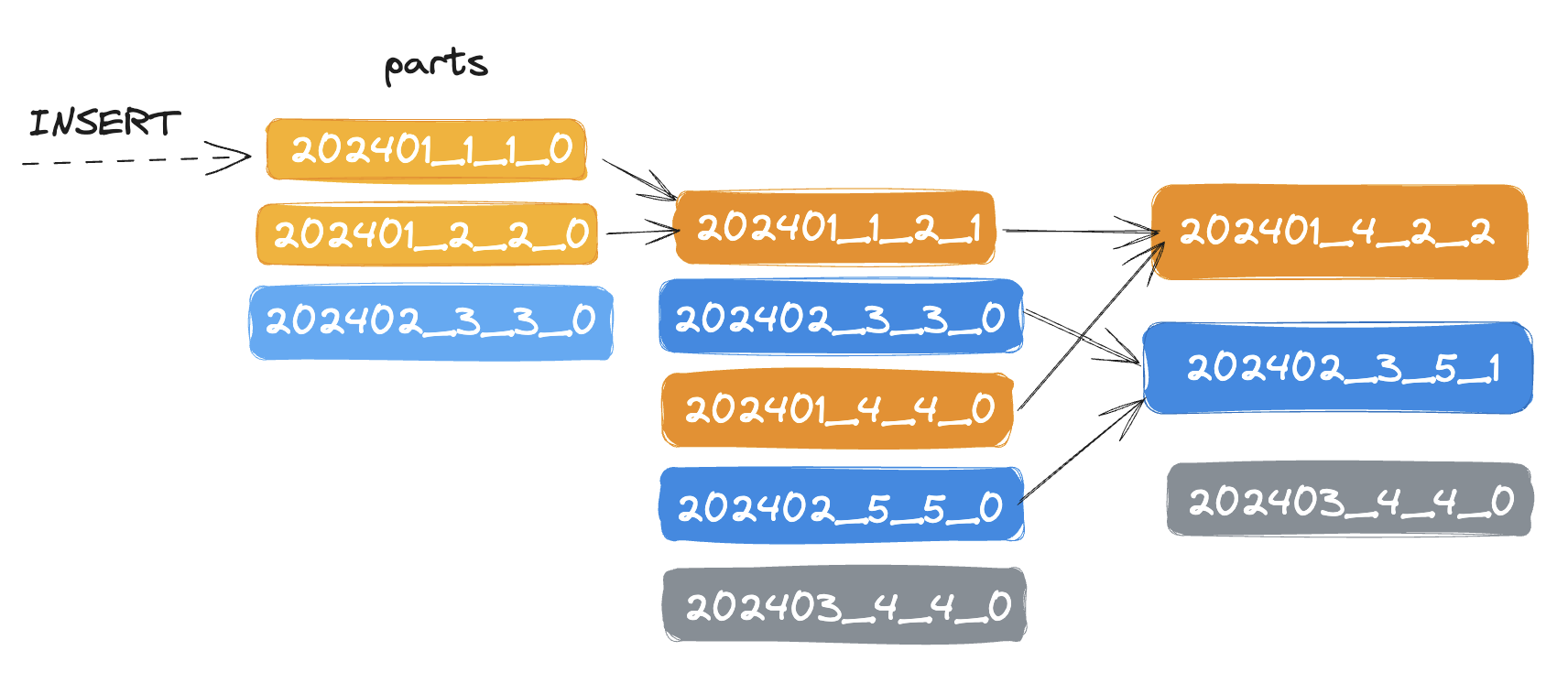
The [`MergeTree`](https://clickhouse.com/docs/en/engines/table-engines/mergetree-family/mergetree) engine and other engines of this family (`*MergeTree`) are the most commonly used and most robust ClickHouse table engines. The data is quickly written to the table part by part, and merging the parts in the background.
```sql
PARTITION BY toYYYYMM(event_date)
```
Each partition is stored separately folder
- `202401/`
- `202402/`
- ...
ClickHouse also automatically cuts off the partition data where the partitioning key is specified in the query. The partition key cannot be modified. In most cases, you don't need a partition key. Don't partition your data by client identifiers or names.
# ORDER BY
```sql
ORDER BY (user_id, event_date)
```
The data will be merged and sorted by `(user_id, event_time)`. This data is stored as separate **parts** (chunks) sorted by the primary key. Within 10-15 minutes after insertion, the parts of the same partition are merged into a complete part. Note that a part is different from a partition; a **part** is a smaller unit within a **partition**. Use the `ORDER BY tuple()` syntax, if you do not need sorting.
# Insert data
Inserts data into a table.
```sql
INSERT INTO events (event_time, user_id, event_type, value)
VALUES
(now(), 111, 'click', '/home'),
(now(), 222, 'click', '/blog');
```
```sql
SELECT * FROM events;
┌──────────event_time─┬─event_date─┬─user_id─┬─event_type─┬─value─┐
│ 2024-05-31 08:13:27 │ 2024-05-31 │ 111 │ click │ /home │
│ 2024-05-31 08:13:27 │ 2024-05-31 │ 222 │ click │ /blog │
└─────────────────────┴────────────┴─────────┴────────────┴───────┘
```
`event_date` is automatic assign by the `DEFAULT toDate(event_time)`. It is also possible to use `DEFAULT` keyword to insert default values:
```sql
INSERT INTO events VALUES (now(), DEFAULT, 333, 'click', '/insights')
```
```sql
SELECT * FROM events
Query id: f7d18374-4439-4bfb-aa2f-478a7269f45d
┌──────────event_time─┬─event_date─┬─user_id─┬─event_type─┬─value─────┐
│ 2024-05-31 08:16:36 │ 2024-05-31 │ 333 │ click │ /insights │
└─────────────────────┴────────────┴─────────┴────────────┴───────────┘
┌──────────event_time─┬─event_date─┬─user_id─┬─event_type─┬─value─┐
│ 2024-05-31 08:13:27 │ 2024-05-31 │ 111 │ click │ /home │
│ 2024-05-31 08:13:27 │ 2024-05-31 │ 222 │ click │ /blog │
└─────────────────────┴────────────┴─────────┴────────────┴───────┘
```
When using the `clickhouse client` binary in the terminal, you can see that the returned data is separated into two blocks because the data has not been merged yet. Check the number of parts:
```sql
SELECT table, partition, name, rows, path
FROM system.parts
WHERE database = 'default' AND table = 'events'
┌─table──┬─partition─┬─name─────────┬─rows─┬─path─────────────────────────────────────────────────────────────────────────────┐
│ events │ 202405 │ 202405_1_1_0 │ 2 │ /var/lib/clickhouse/store/410/410ccafd-c5ac-48b7-93e6-42b6a82f4ece/202405_1_1_0/ │
│ events │ 202405 │ 202405_2_2_0 │ 1 │ /var/lib/clickhouse/store/410/410ccafd-c5ac-48b7-93e6-42b6a82f4ece/202405_2_2_0/ │
└────────┴───────────┴──────────────┴──────┴──────────────────────────────────────────────────────────────────────────────────┘
```
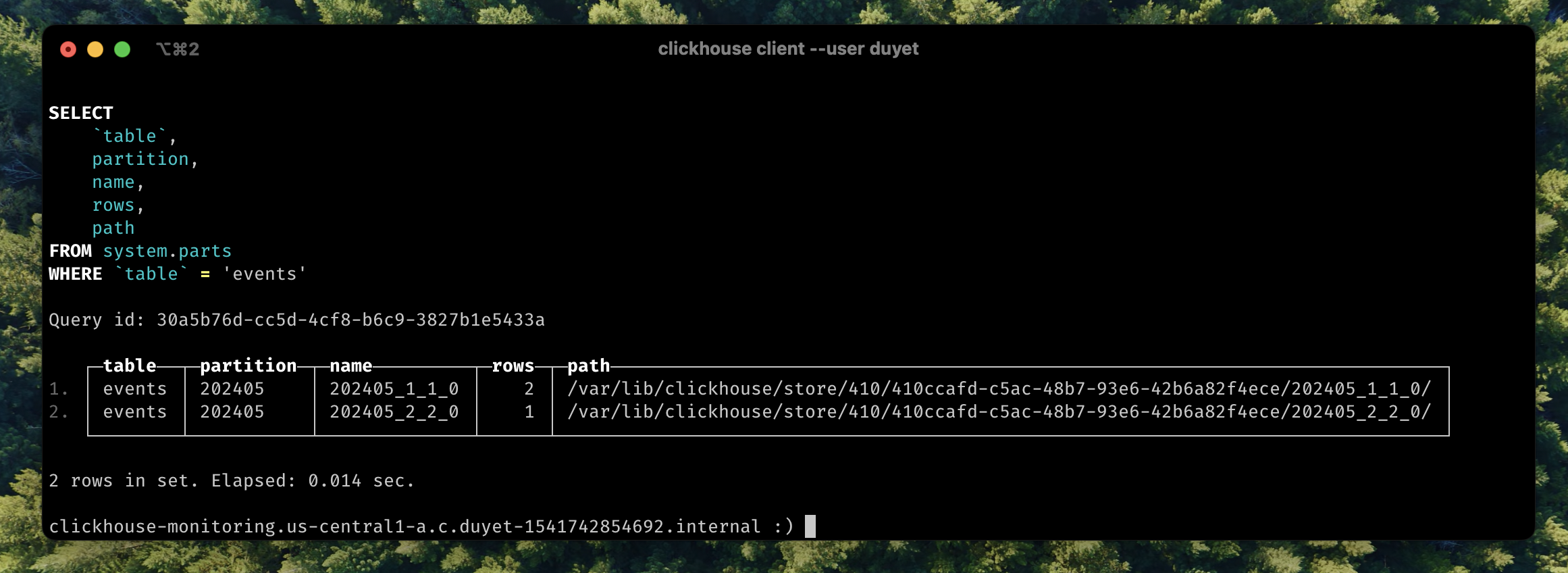
Data is not merged yet, there is many to make it happens like `OPTIMIZE` table:
```sql
OPTIMIZE TABLE default.events FINAL
```
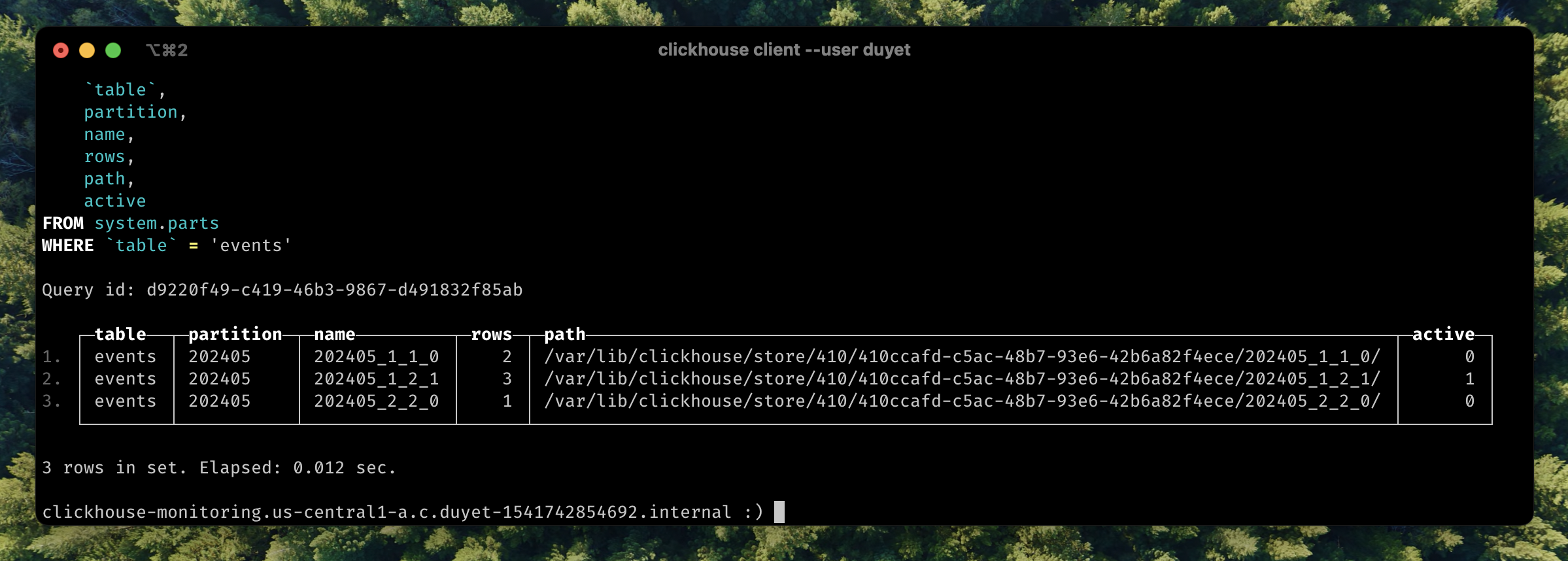
ClickHouse will merge into new part `202405_1_2_1` mark it as **active** part, and **inactive** will be clean up later.
### Insert by FORMAT
Data can be passed to the INSERT in any [format](https://clickhouse.com/docs/en/interfaces/formats#formats) supported by ClickHouse. The format must be specified explicitly in the query, for example:
```sql
INSERT INTO events FORMAT JSONEachRow
{"event_time": "2024-06-01 00:00:00", "user_id": "111", "event_type": "scroll", "value": "/blog"}
Ok.
```
Bonus: You can change the data format returns from SELECT query:
```sql
SELECT * FROM events LIMIT 3 Format CSV;
"2024-05-31 09:40:00","2024-05-31",16089454,"click","/insights"
"2024-05-31 09:40:00","2024-05-31",16089454,"click","/insights"
"2024-05-31 09:40:00","2024-05-31",16089454,"click","/insights"
```
Some common formats for Input and Output data
- [TabSeparated](https://clickhouse.com/docs/en/interfaces/formats#tabseparated)
- [CSV](https://clickhouse.com/docs/en/interfaces/formats#csv)
- [JSONEachRow](https://clickhouse.com/docs/en/interfaces/formats#jsoneachrow)
- ...
# UNDROP 🤯
Like every other database engine, you can DROP one or more tables, but you can even `UNDROP` them within up to 8 minutes (by default, can be adjusted using the `database_atomic_delay_before_drop_table_sec` setting).
```sql
DROP TABLE events;
UNDROP TABLE events;
```
# DETACH/ATTACH
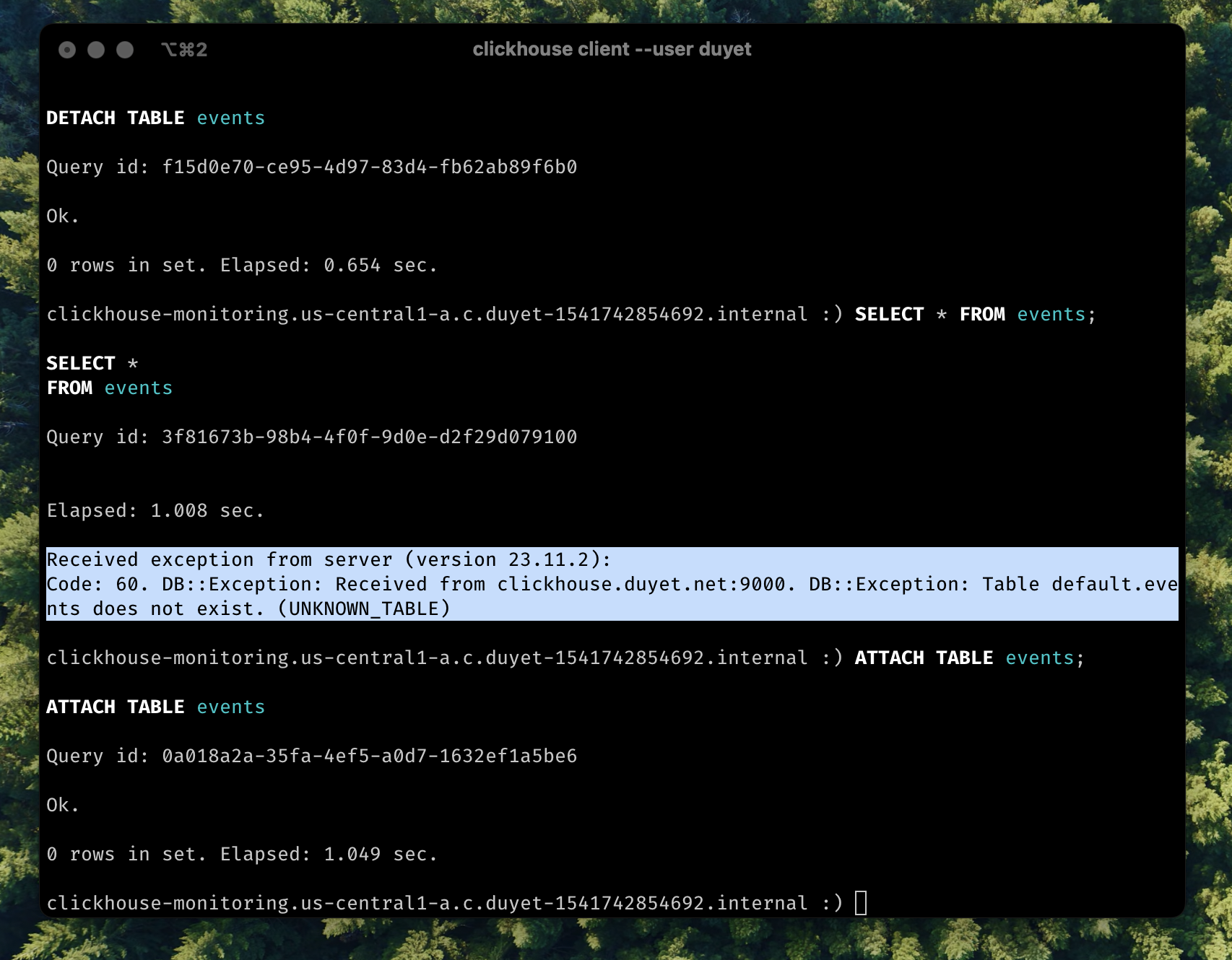
Detaching a table makes the server "forget" about the existence of the table. This action does not delete the data or metadata of the table. I usually `DETACH` it when encountering some issues that need to be fixed under the file system, and then `ATTACH` it to scan and load it back.
# TTL
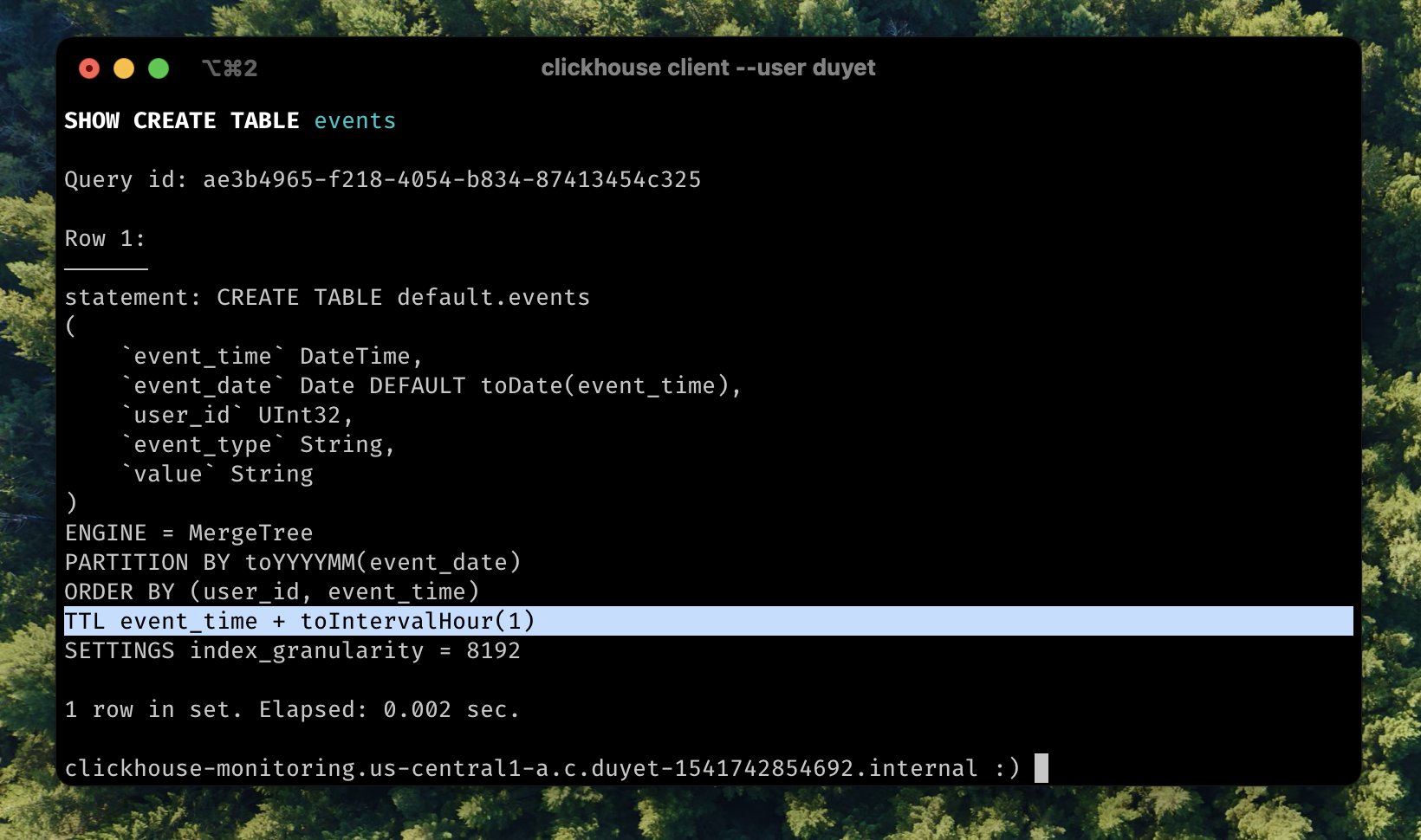
TTL (time-to-live) refers to the capability of moving, deleting, or rolling up rows or columns after a certain interval of time has passed. This actually happens when data is being merged. TTL can be applied to each column or the whole row level. [More detail in document](https://clickhouse.com/docs/en/guides/developer/ttl).
Now modify the table above:
```sql
ALTER TABLE events MODIFY TTL event_time + INTERVAL 1 HOUR;
```
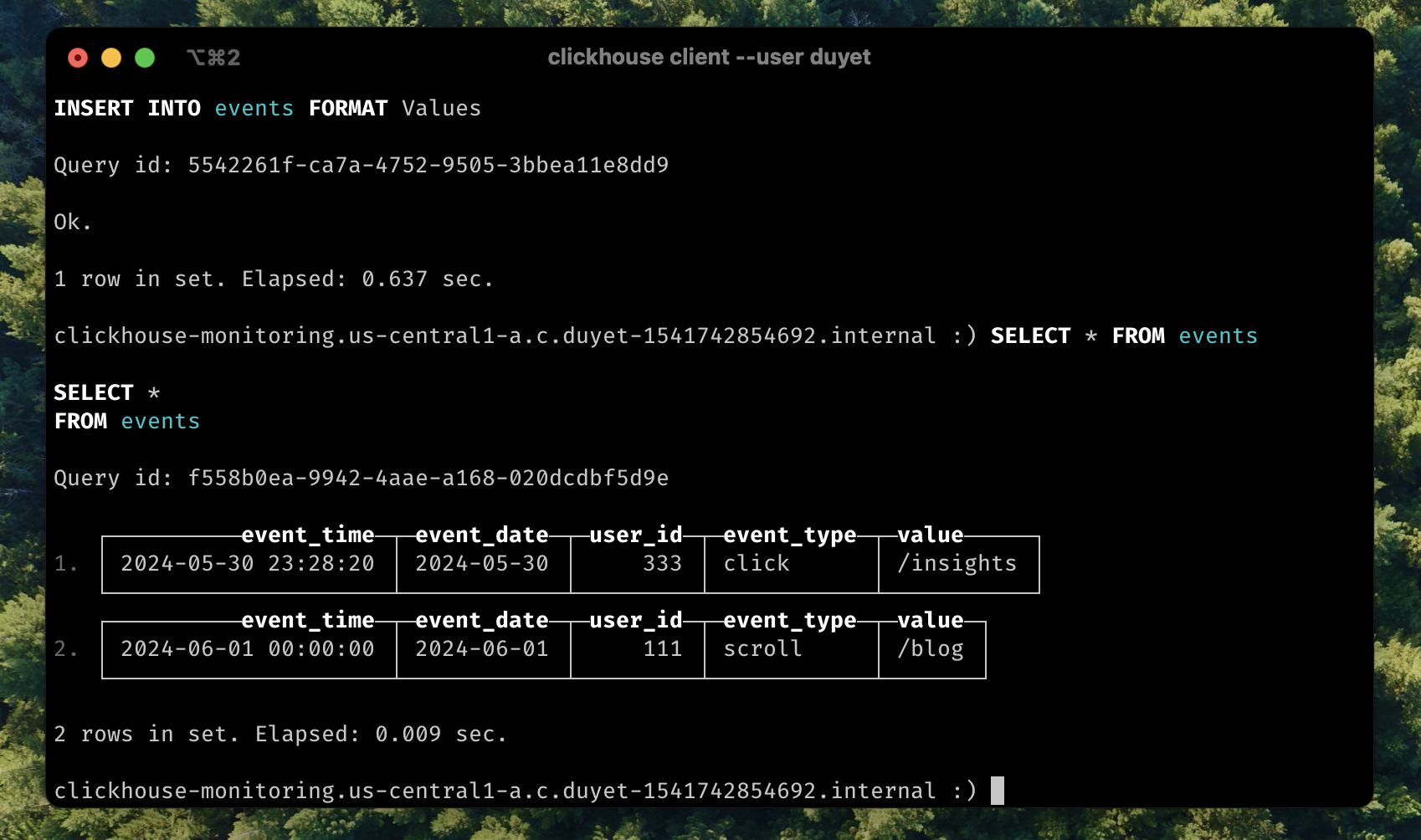
Insert old data:
```sql
INSERT INTO events VALUES (now() - interval 10 hour, DEFAULT, 333, 'click', '/insights');
-- Quickly select the data
SELECT * FROM events;
```
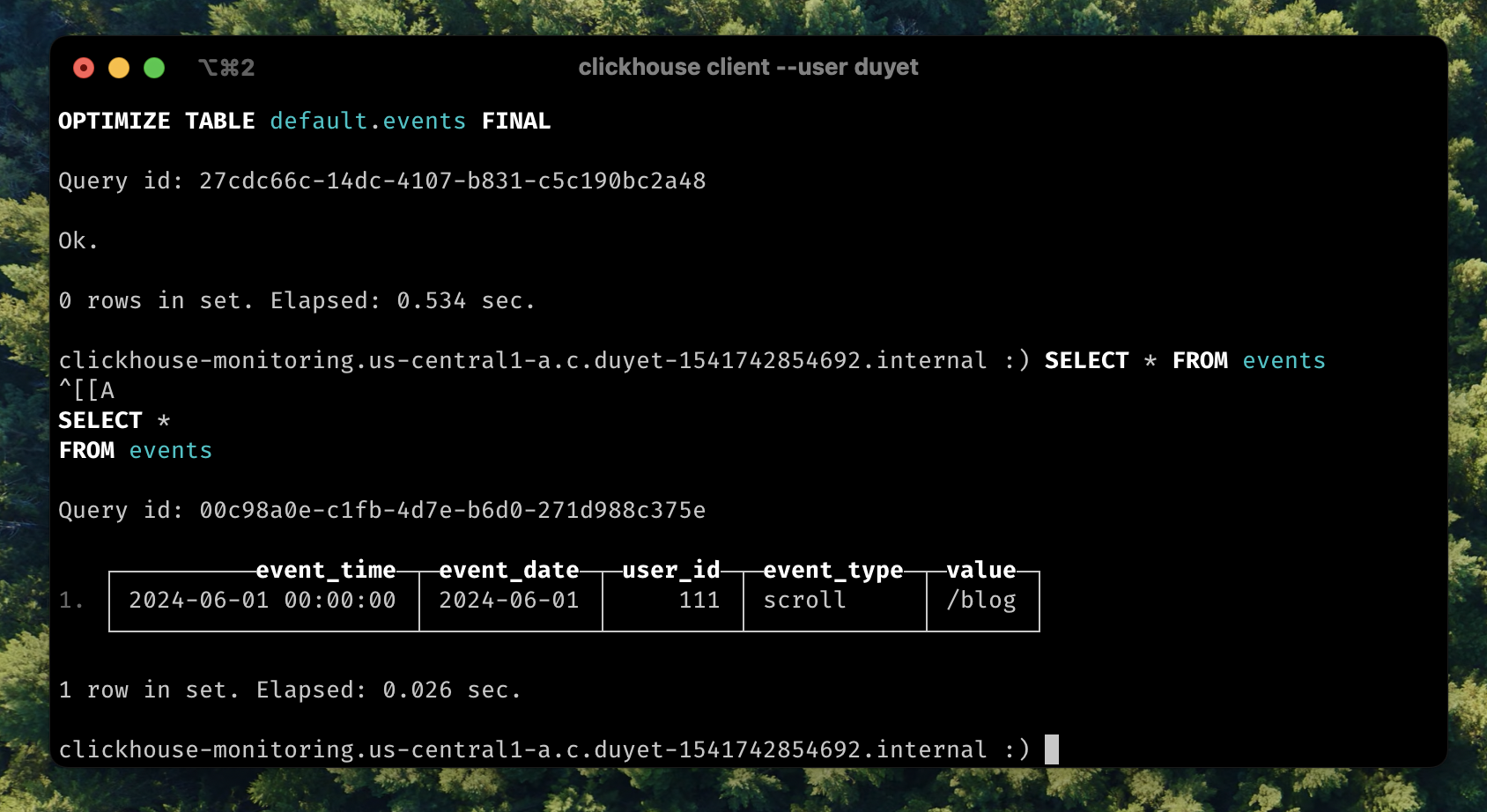
After for a while or to force TTL cleanup by `OPTIMIZE`:
```sql
OPTIMIZE TABLE events FINAL;
SELECT * FROM events;
```
Second row was deleted from table.
# LowCardinality(T) column data type
If you have a column like this
```sql
SELECT event_type FROM events;
┌─event_type─┐
│ click │
│ pageview │
│ pageview │
│ pageview │
│ pageview │
│ pageview │
│ click │
│ click │
│ click │
│ click │
│ pageview │
│ pageview │
│ pageview │
│ pageview │
SELECT event_type, COUNT() FROM events GROUP BY 1;
┌─event_type─┬──count()─┐
│ click │ 17563648 │
│ scroll │ 262144 │
│ pageview │ 15466496 │
└────────────┴──────────┘
3 rows in set. Elapsed: 28.517 sec. Processed 33.29 million rows, 512.75 MB (1.17 million rows/s., 17.98 MB/s.)
```
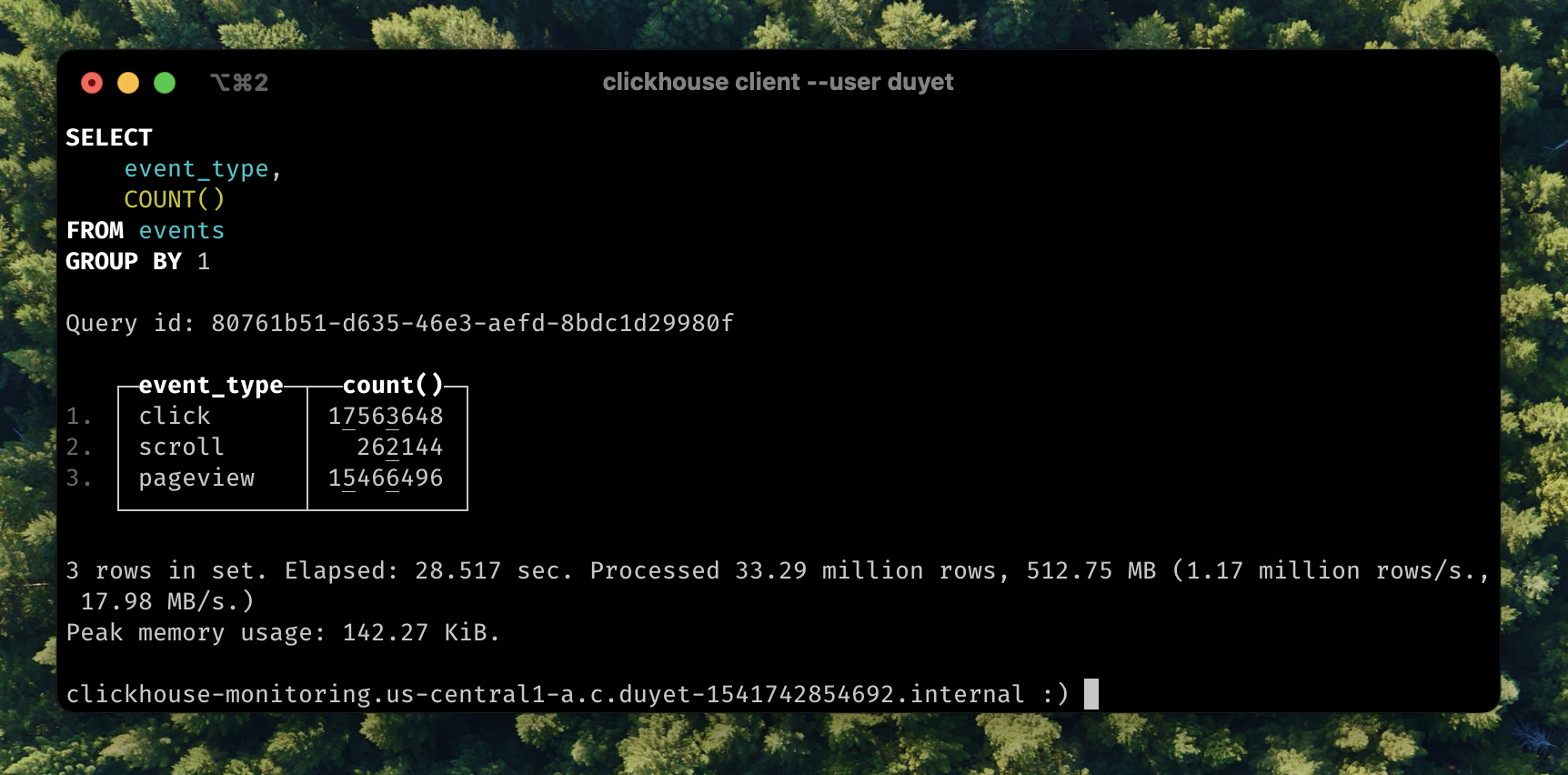
The value is repeated. Consider using [`Enum`](https://clickhouse.com/docs/en/sql-reference/data-types/enum) when you have a handful of unique values or [`LowCardinality`](https://clickhouse.com/docs/en/sql-reference/data-types/lowcardinality) when you have up to 10,000 unique values (e.g. `click`, `pageview`,...) of a column.
Let’s look at how `event_type` column are stored
```sql
SELECT
column,
any(type),
formatReadableSize(sum(column_data_compressed_bytes)) AS compressed,
formatReadableSize(sum(column_data_uncompressed_bytes)) AS uncompressed,
round(sum(column_data_uncompressed_bytes) / sum(column_data_compressed_bytes), 2) AS compr_ratio,
sum(rows)
FROM system.parts_columns
WHERE (`table` = 'events') AND active AND (column = 'event_type')
GROUP BY column
ORDER BY column ASC
┌─column─────┬─any(type)─┬─compressed─┬─uncompressed─┬─compr_ratio─┬─sum(rows)─┐
│ event_type │ String │ 1.04 MiB │ 233.25 MiB │ 225.34 │ 33292288 │
└────────────┴───────────┴────────────┴──────────────┴─────────────┴───────────┘
```
I will change the type of the `event_type` column to `LowCardinality`. This can be done with a simple spell that looks like an `ALTER TABLE` statement.
```sql
ALTER TABLE events
MODIFY COLUMN `event_type` LowCardinality(String);
0 rows in set. Elapsed: 99.556 sec.
```
This took 99 seconds in my tiny server. Now checking the column size again:
```sql
SELECT
column,
any(type),
formatReadableSize(sum(column_data_compressed_bytes)) AS compressed,
formatReadableSize(sum(column_data_uncompressed_bytes)) AS uncompressed,
round(sum(column_data_uncompressed_bytes) / sum(column_data_compressed_bytes), 2) AS compr_ratio,
sum(rows)
FROM system.parts_columns
WHERE (`table` = 'events') AND active AND (column = 'event_type')
GROUP BY column
ORDER BY column ASC
┌─column─────┬─any(type)──────────────┬─compressed─┬─uncompressed─┬─compr_ratio─┬─sum(rows)─┐
│ event_type │ LowCardinality(String) │ 151.16 KiB │ 31.56 MiB │ 213.81 │ 33292288 │
└────────────┴────────────────────────┴────────────┴──────────────┴─────────────┴───────────┘
```
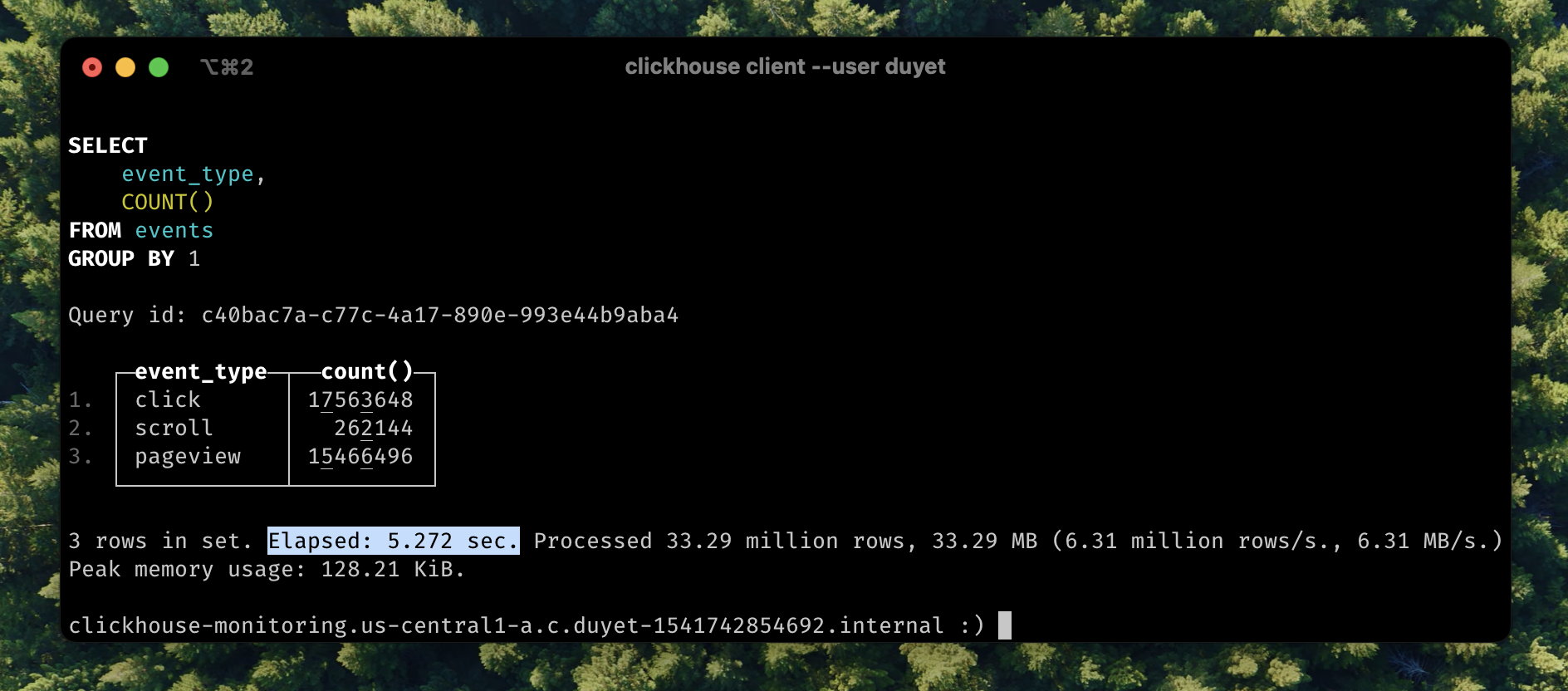
The storage size has been reduced **x7 times**, and compressed is just now only **151 KiB**. In some case you even get better compr_ratio. This also improved query performance:
```diff
SELECT event_type, COUNT() FROM events GROUP BY 1;
- 3 rows in set. Elapsed: 28.517 sec. Processed 33.29 million rows, 512.75 MB (1.17 million rows/s., 17.98 MB/s.)
+ 3 rows in set. Elapsed: 5.272 sec. Processed 33.29 million rows, 33.29 MB (6.31 million rows/s., 6.31 MB/s.)
```
The query now runs **5.41 times faster**. `LowCardinality` changes the internal representation of other data types to be dictionary-encoded.